DocumentationDocumentation
Darty.ai
Get Started
Basics
Methods
Colors
UI
Workflows
Darty.ai
Get Started
Basics
Methods
Colors
UI
Workflows
  • Get Started

    • Installation and Login
    • Your First Darty Document
    • Installers - Instructions and Downloads
    • Licensing
  • Basics

    • Darty Basics
    • Darty Header
    • Darty Tags
  • Methods

    • Darty Methods
    • Align
    • Appearance - General
    • Appearance - Colors & Swatches
    • Appearance - Effect Properties
    • Artboard Methods
    • Arrange
    • Attributes
    • Barcode
    • Barcode Formats
    • Clean Document
    • Clipping Mask Make and Release
    • Color Mode
    • Comment
    • Compound Path - Make and Release
    • Distribute
    • Duplicate
    • Expand
    • Fit To Bounds
    • Graphic Style
    • Group & Ungroup
    • Layer Methods
    • Outline
    • Pathfinder
    • Place
    • Rasterize
    • Reduce To Basic Appearance
    • Remove
    • Swatch Methods
    • Tags Methods
    • Template
    • Text
    • Transform Methods
    • zOrder
    • Skip and *
  • Colors

    • Color Libraries
  • User Interface

    • Darty User-Interface
    • Tools Tab
    • Tools Builder
      • Builder Table Anatomy
      • Builder Data Sources and Files
      • Builder Method Blocks
      • Builder Rows, Cells, and Navigation
    • Tools Methods
      • Tools Method Actions and Apply Modes
      • Tools Method Table Preview
      • Align Tool
      • Appearance Tool
      • Graphic Style Tool
      • Artboard Tool
      • Attributes Tool
      • Arrange Tool
      • Barcode Tool
      • Color Mode Tool
      • Clean Tool
      • Clipping Tool
      • Comment Tool
      • Compound Path Tool
      • Distribute Tool
      • Duplicate Tool
      • Expand Tool
      • Fit to Bounds Tool
      • Group Tool
      • Ungroup Tool
      • Layer Tool
      • Outline Tool
      • Pathfinder Tool
      • Place Tool
      • Rasterize Tool
      • Reduce Tool
      • Remove Tool
      • Swatches Tool
      • Tags Tool
      • Text Tool
      • Transform Tool
      • Z-Order Tool
    • Tags Tab
    • Data Tab
    • Export Tab
    • Settings Tab
    • Help Tab
    • Export Settings
    • Export Validation
    • Job Export Settings
    • Export Counter Variables
    • Export Progress
    • Export Presets
    • Recent Files
    • Color Dialog
  • Cloud Data

    • Darty-Ai Cloud Data Integrations
    • Darty-Ai with Google Sheets
  • Workflows

    • Darty Workflows
    • Darty Preview
    • Darty Export Workflows
    • Darty Data Workflows
  • Site Blog

    • ⭐️Getting Started ⭐️
    • ⭐️Placing Images in Darty-Ai ⭐️
    • 🚀 New Features — Darty-Ai 1.7.8 (March 2026)
    • Creating a Basic Pie-Chart with Line-Art & Data
    • Customer Data and Darty-Ai
    • Darty-Ai Now Supports Google Sheets
    • External SVGs with Darty-Ai
    • Preview Your Documents
    • Self-Adjusting Logo Automation
    • State Management for Artwork Appearance
    • Text Replacements and Formatting
    • Using Private Google Sheets Shared with Business Emails
  • Site Pages

    • 🏠 Home
    • 💰 Pricing
    • Downloads
  • Release Notes
  • Downloads

Outline

The outline method outlines texts in tagged texts, if a group is tagged, all the texts in the group will be outlined and not just the text in the top level of the group.

To prevent the method being applied to a row, inside the method, leave the tagSearch value blank or set it to "" or use either the generic * property and set the cell value to false or the generic skip property and set the cell value to true.

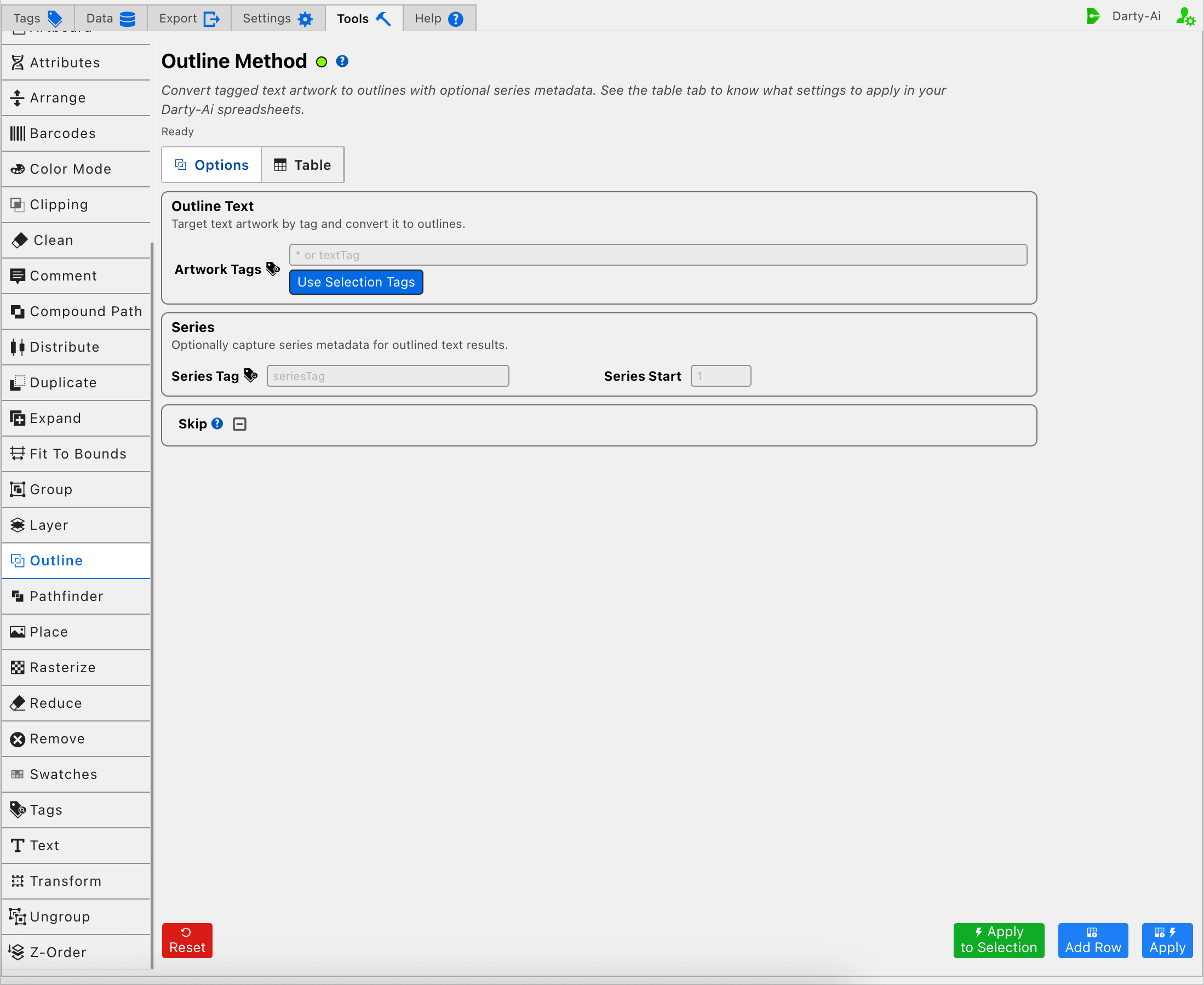
See the Outline Tool for the visual editor.

Example Spreadsheet

*
outlinecomment
tagSearch*
All the document's texts will be outlined
titleOnly texts in containers labeled "title" will be outlined
""The outline method will be skipped
*
outlinecomment
**
All the document's texts will be outlined
falseThe outline method will be skipped

Outline Properties

ModeDescription
tagSearch 
The tag search of the container of the text to outline. To outline all document's text do not provide a tagSearch
seriesTag 
A tag prefix used to apply numbered Darty Tags to the outlined results.
Sample Values: outlined, letter, result
seriesStart 
The starting number appended to seriesTag. It has an effect only when seriesTag is provided.
Sample Values: 1, 5, 11
* 
Set to false if you want the method to be skipped in a particular row.
Valid Values: true or false
skip 
Set to true is you want the method to be skipped in a particular row.
See * and Skip for details.
Valid Values: true or false
Last Updated: 7/21/26, 9:47 AM
Contributors: Trevor, Vasily Hall
Prev
Layer Methods
Next
Pathfinder