DocumentationDocumentation
Darty.ai
Get Started
Basics
Methods
Colors
UI
Workflows
Darty.ai
Get Started
Basics
Methods
Colors
UI
Workflows
  • Get Started

    • Installation and Login
    • Your First Darty Document
    • Installers - Instructions and Downloads
    • Licensing
  • Basics

    • Darty Basics
    • Darty Header
    • Darty Tags
  • Methods

    • Darty Methods
    • Align
    • Appearance - General
    • Appearance - Colors & Swatches
    • Appearance - Effect Properties
    • Artboard Methods
    • Arrange
    • Attributes
    • Barcode
    • Barcode Formats
    • Clean Document
    • Clipping Mask Make and Release
    • Color Mode
    • Comment
    • Compound Path - Make and Release
    • Distribute
    • Duplicate
    • Expand
    • Fit To Bounds
    • Graphic Style
    • Group & Ungroup
    • Layer Methods
    • Outline
    • Pathfinder
    • Place
    • Rasterize
    • Reduce To Basic Appearance
    • Remove
    • Swatch Methods
    • Tags Methods
    • Template
    • Text
    • Transform Methods
    • zOrder
    • Skip and *
  • Colors

    • Color Libraries
  • User Interface

    • Darty User-Interface
    • Tools Tab
    • Tools Builder
      • Builder Table Anatomy
      • Builder Data Sources and Files
      • Builder Method Blocks
      • Builder Rows, Cells, and Navigation
    • Tools Methods
      • Tools Method Actions and Apply Modes
      • Tools Method Table Preview
      • Align Tool
      • Appearance Tool
      • Graphic Style Tool
      • Artboard Tool
      • Attributes Tool
      • Arrange Tool
      • Barcode Tool
      • Color Mode Tool
      • Clean Tool
      • Clipping Tool
      • Comment Tool
      • Compound Path Tool
      • Distribute Tool
      • Duplicate Tool
      • Expand Tool
      • Fit to Bounds Tool
      • Group Tool
      • Ungroup Tool
      • Layer Tool
      • Outline Tool
      • Pathfinder Tool
      • Place Tool
      • Rasterize Tool
      • Reduce Tool
      • Remove Tool
      • Swatches Tool
      • Tags Tool
      • Text Tool
      • Transform Tool
      • Z-Order Tool
    • Tags Tab
    • Data Tab
    • Export Tab
    • Settings Tab
    • Help Tab
    • Export Settings
    • Export Validation
    • Job Export Settings
    • Export Counter Variables
    • Export Progress
    • Export Presets
    • Recent Files
    • Color Dialog
  • Cloud Data

    • Darty-Ai Cloud Data Integrations
    • Darty-Ai with Google Sheets
  • Workflows

    • Darty Workflows
    • Darty Preview
    • Darty Export Workflows
    • Darty Data Workflows
  • Site Blog

    • ⭐️Getting Started ⭐️
    • ⭐️Placing Images in Darty-Ai ⭐️
    • 🚀 New Features — Darty-Ai 1.7.8 (March 2026)
    • Creating a Basic Pie-Chart with Line-Art & Data
    • Customer Data and Darty-Ai
    • Darty-Ai Now Supports Google Sheets
    • External SVGs with Darty-Ai
    • Preview Your Documents
    • Self-Adjusting Logo Automation
    • State Management for Artwork Appearance
    • Text Replacements and Formatting
    • Using Private Google Sheets Shared with Business Emails
  • Site Pages

    • 🏠 Home
    • 💰 Pricing
    • Downloads
  • Release Notes
  • Downloads

Downloads

Downloads Page

Installers

Download the Darty-Ai installer that matches your Adobe Illustrator version and operating system.

A valid Darty-Ai subscription is required to use the plugin.

You can get a free or paid subscription at

https://darty.ai/pricing/

.

Darty-Ai for Adobe Illustrator

Latest Version: 2.0.0-5786

This is a non-admin installer. FULL of new functions.
The installer is for Illustrator 2026, 2025, and 2024.
See our release notes for more information.
A full post will be available soon.
Download: Darty-Ai v2.0.0-5786 for Adobe Illustrator.pkg - (Mac)Darty-Ai v2.0.0 for Illustrator - Mac
Download: Darty-Ai v2.0.0-5786 for Adobe Illustrator.exe - (Windows)Darty-Ai v2.0.0 for Illustrator - Windows

Updating Darty-Ai

With the new installer updating Darty-Ai should become exception simple.
BUT for current users who have a version of Darty-Ai previous to v2 installed, the upgrade process is a bit more complex, as they need to remove the old version before installing the new one.
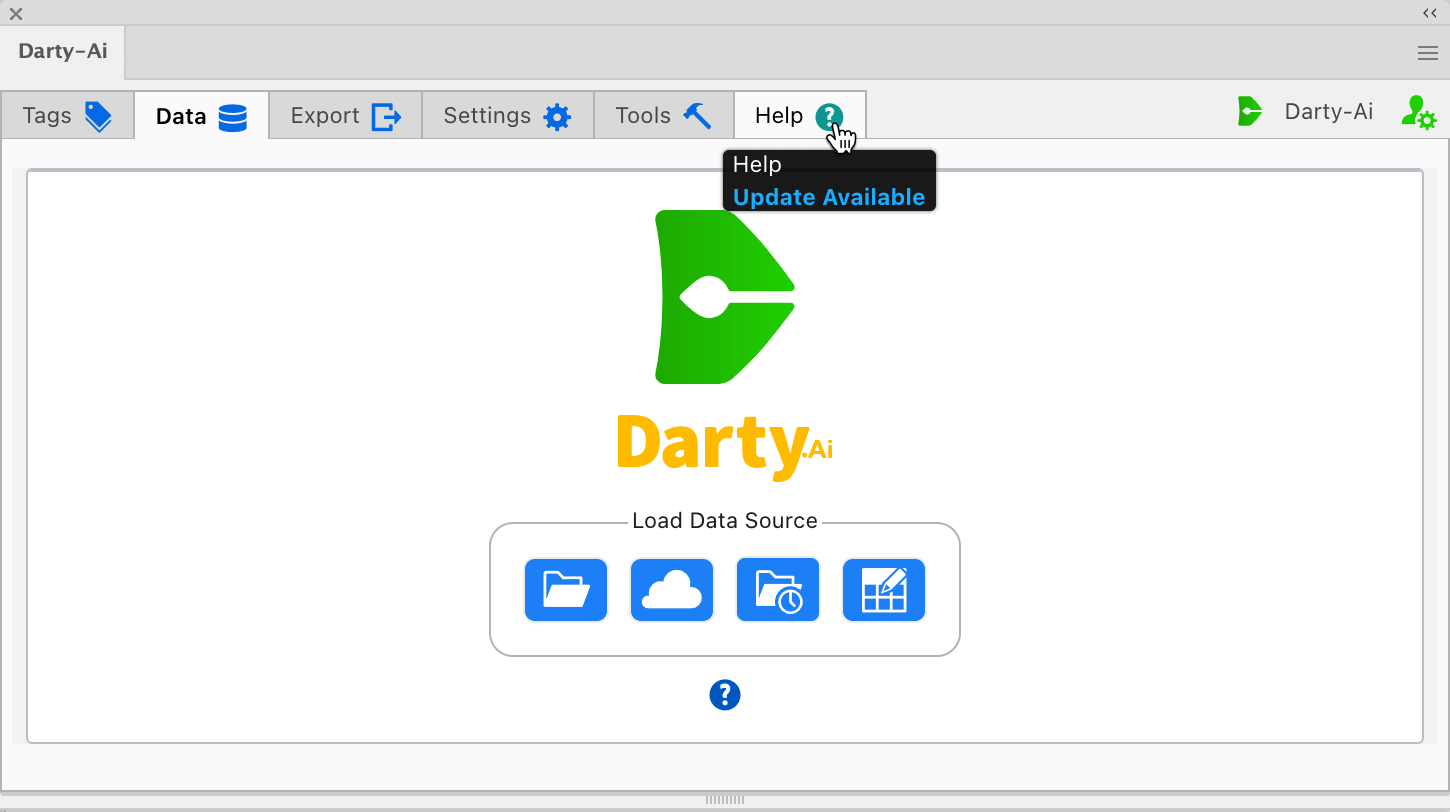
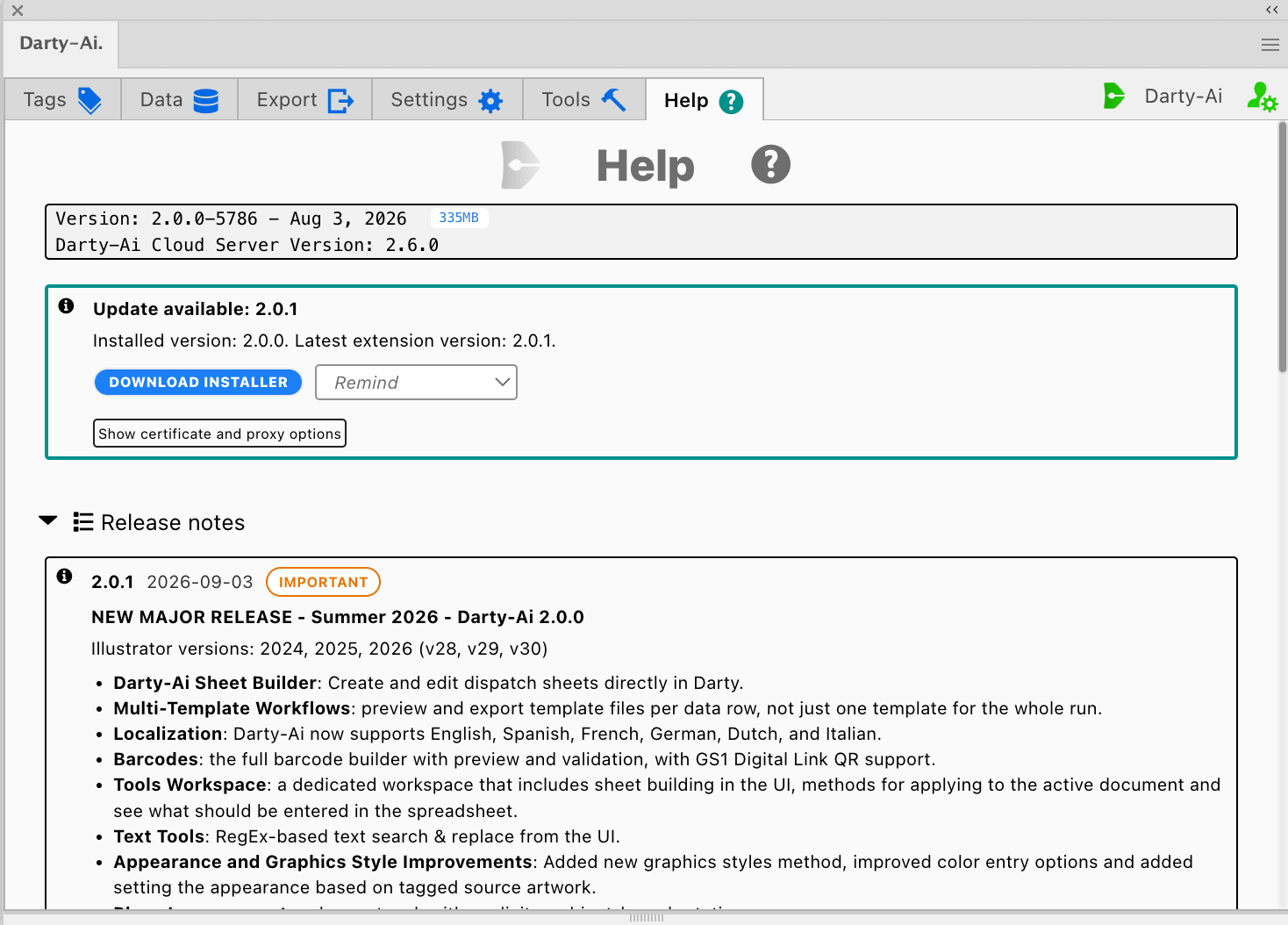
When an update is available, the Help tab's icon will change color and flash, click on the help tab.
Aupdate Available

Then click on the DOWNLOAD INSTALLER button, and then when it appears, click on the INSTALL button, then close Illustrator before clicking Next on the installer.
Aupdate Available

Removing Pre Darty 2.0.0 Versions

If you have a pre v2 install, when Illustrator is closed, remove the following folders:

    Mac
  • /Library/Application Support/Adobe/CEP/extensions/Darty
  • /Applications/Adobe Illustrator 2026/Plug-ins.localized/Darty

    Windows
  • C:\Program Files\Common Files\Adobe\CEP\extensions\Darty
  • C:\Program Files\Adobe\Adobe Illustrator 2026\Plug-ins\Darty

Downloading Darty-Ai on Windows

Your browser or Microsoft Defender SmartScreen may show a warning because the Darty-Ai installer is updated regularly and not yet commonly downloaded.

  • Open the download options in Microsoft Edge

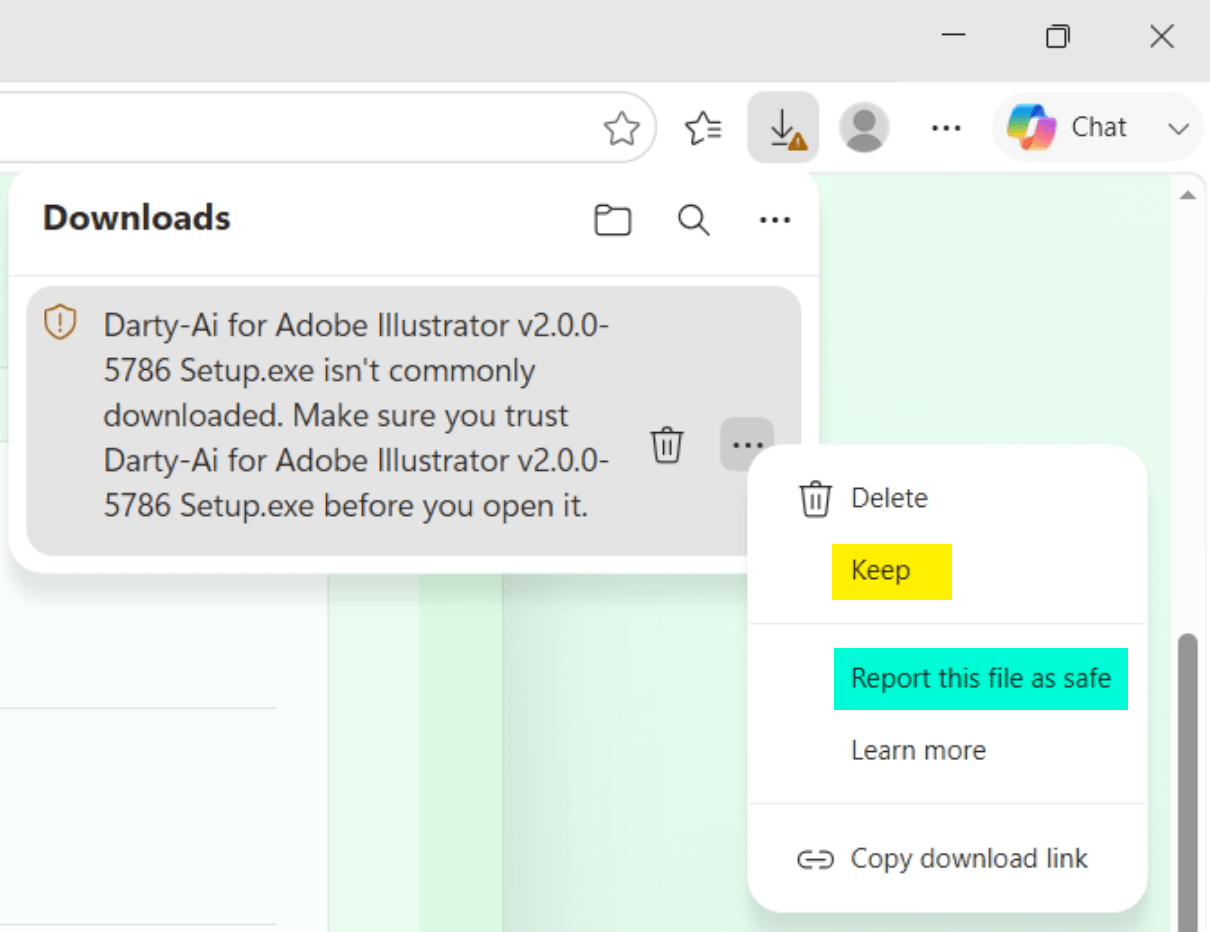
    Open Edge's Downloads panel and select the three-dot menu beside the Darty-Ai installer.
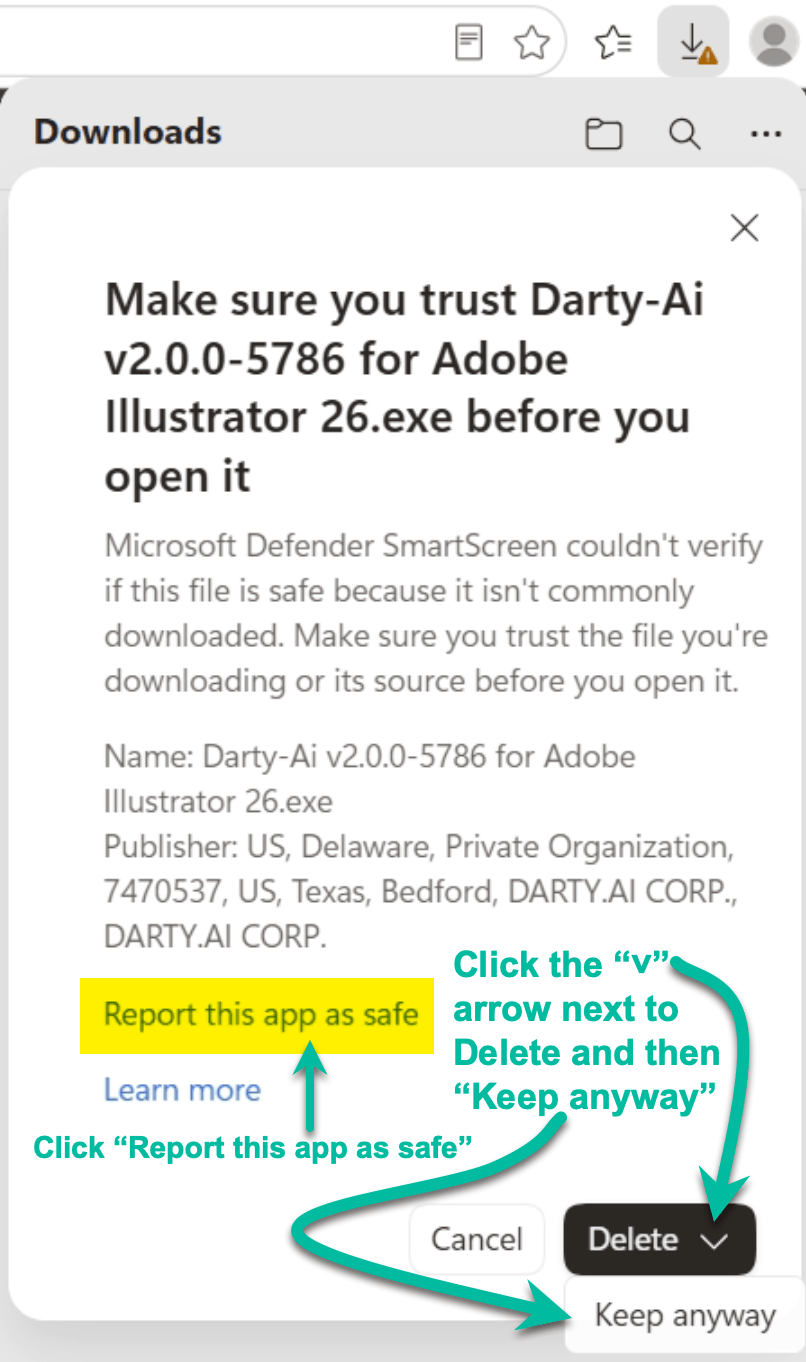
    Please select Report this app as safe to send Microsoft feedback. This will provide others with a smoother download process.

    Microsoft Edge Downloads menu showing Keep and Report this file as safe
  • Confirm that you want to keep the installer

    Then open the arrow beside Delete and select Keep anyway.

    Microsoft Edge confirmation showing Report this app as safe and Keep anyway
  • Open the Microsoft Defender details

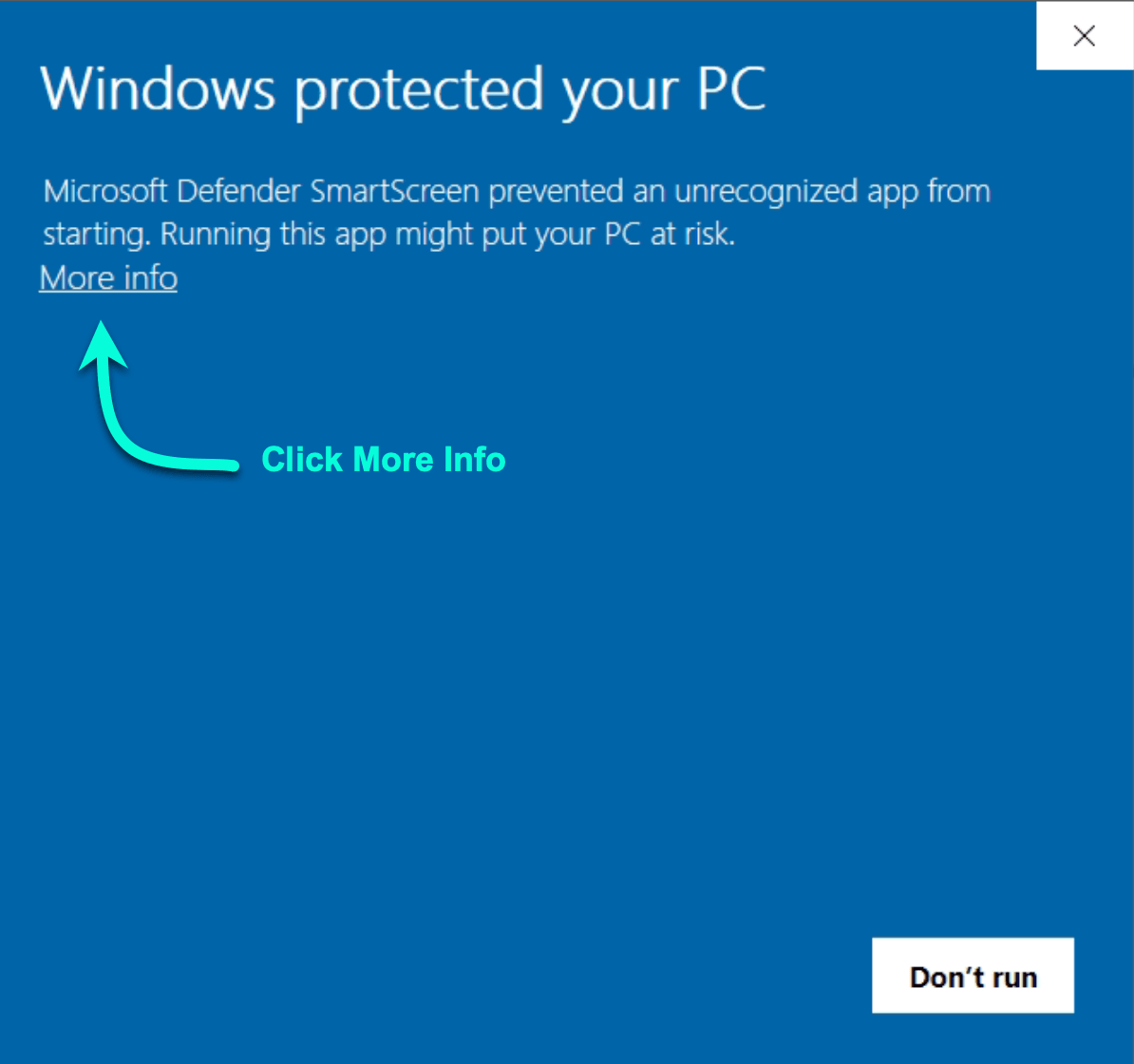
    When you open the installer, Microsoft Defender SmartScreen may display a second warning. Select More info to review the app and publisher before continuing.

    Microsoft Defender SmartScreen warning with More info highlighted
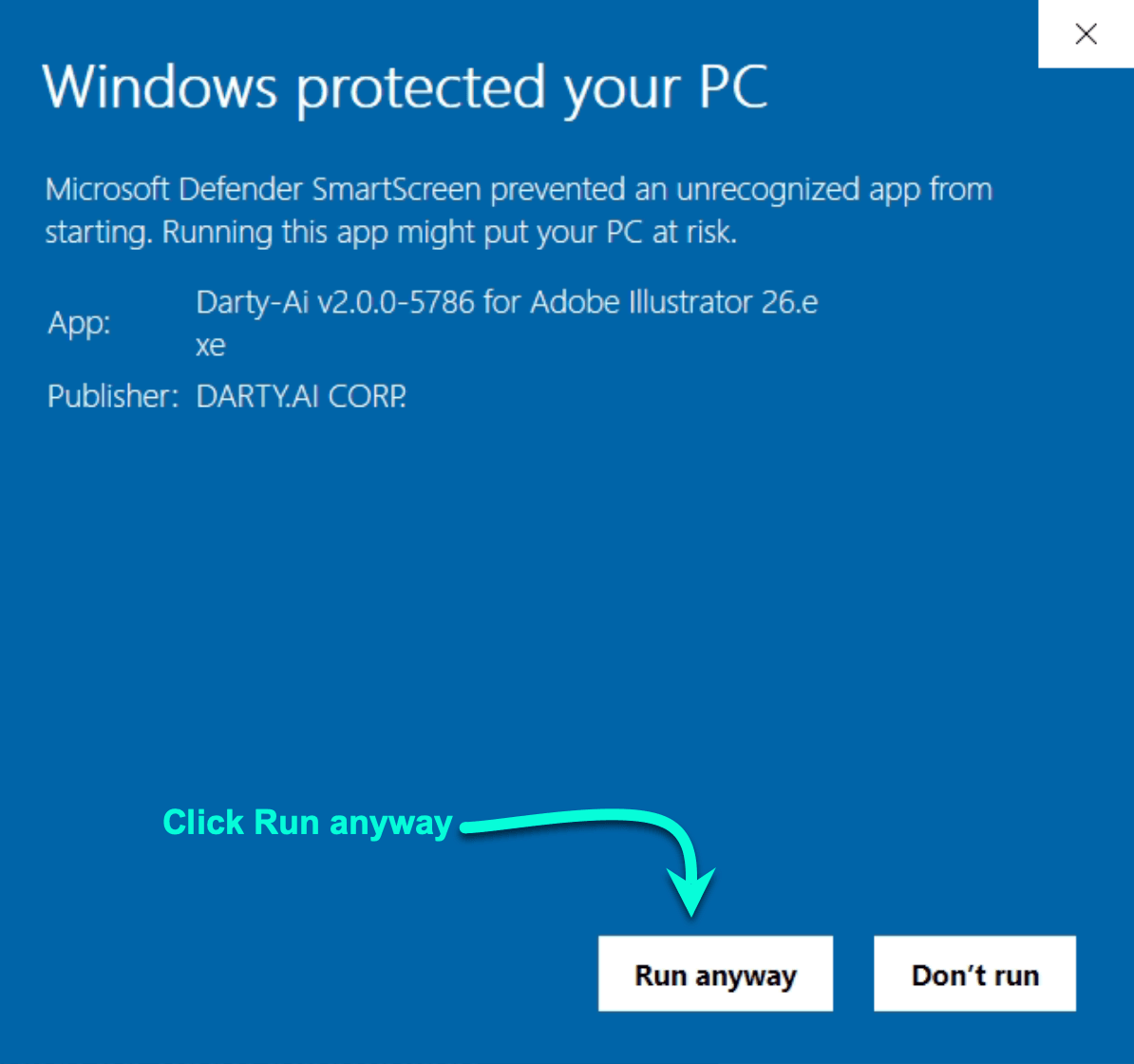
  • Verify the publisher and run the installer

    Confirm that the app is the Darty-Ai installer and that the publisher is DARTY.AI CORP. If those details match, select Run anyway. Do not disable Microsoft Defender.

    Microsoft Defender SmartScreen details identifying DARTY.AI CORP. with Run anyway highlighted
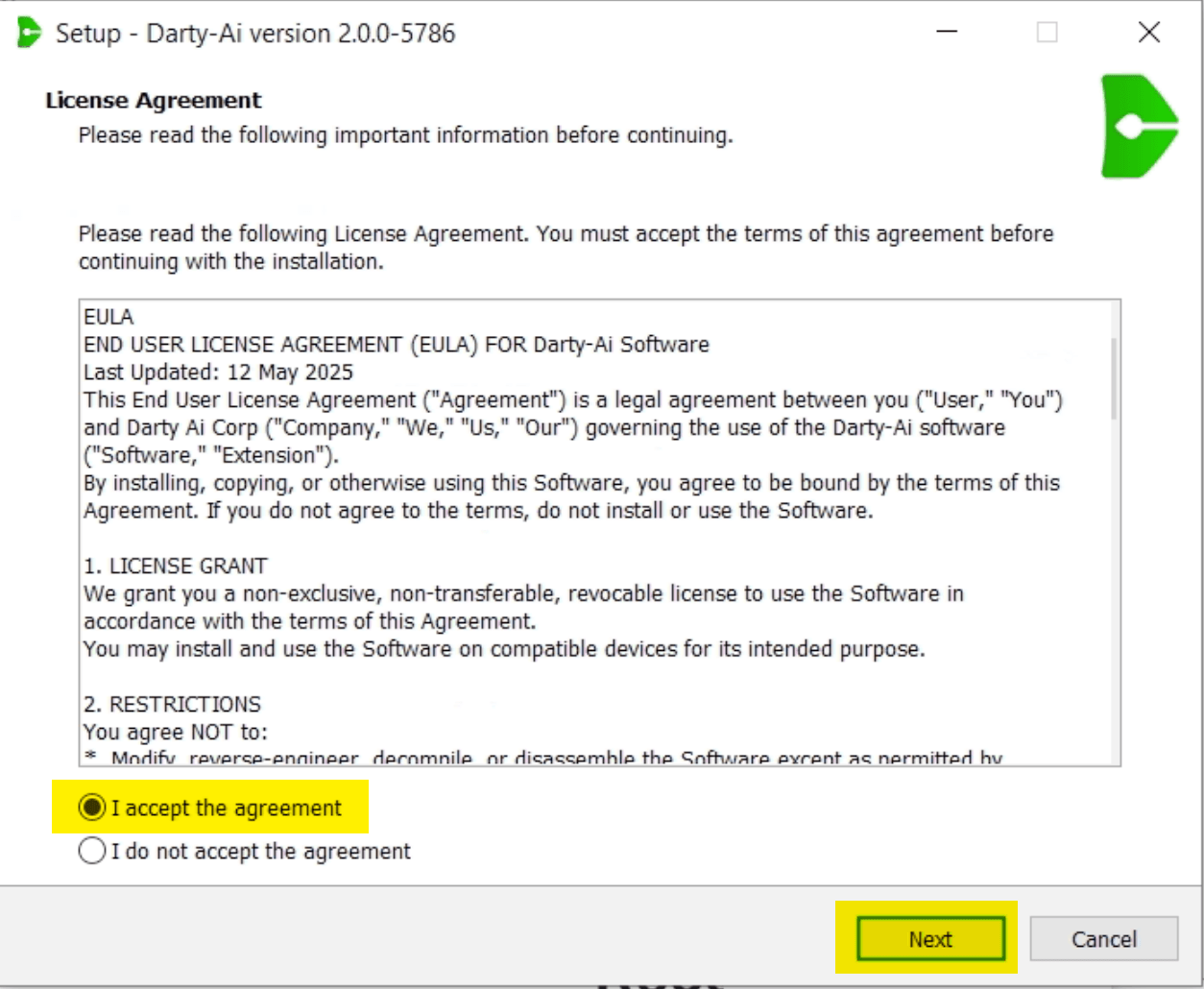
  • Accept the license agreement

    Read the Darty-Ai license agreement, select I accept the agreement, and then select Next to continue the installation.
    Darty-Ai Windows installer showing the license agreement acceptance and Next button

View original page on our main site

Prev
Release Notes