
DocumentationDocumentation
Darty.ai
Get Started
Basics
Methods
Colors
UI
Workflows
Darty.ai
Get Started
Basics
Methods
Colors
UI
Workflows
  • Get Started

    • Installation and Login
    • Your First Darty Document
    • Installers - Instructions and Downloads
    • Licensing
  • Basics

    • Darty Basics
    • Darty Header
    • Darty Tags
  • Methods

    • Darty-Ai Methods
    • Align
    • Appearance - General
    • Appearance - Colors & Swatches
    • Appearance - Effect Properties
    • Artboard Methods
    • Arrange
    • Attributes
    • Barcode
    • Barcode Formats
    • Clean Document
    • Clipping Mask Make and Release
    • Color Mode
    • Comment
    • Compound Path - Make and Release
    • Distribute
    • Duplicate
    • Expand
    • Fit To Bounds
    • Graphic Style
    • Group & Ungroup
    • Layer Methods
    • Outline
    • Pathfinder
    • Place
    • Rasterize
    • Reduce To Basic Appearance
    • Remove
    • Swatch Methods
    • Tags Methods
    • Tables
    • Template
    • Text
    • Transform Methods
    • zOrder
    • Skip and *
  • Colors

    • Color Libraries
  • Sheet Builder
    • Builder Table Anatomy
    • Builder Data Sources and Files
    • Builder Method Blocks
    • Builder Rows, Cells, and Navigation
  • User Interface

    • Darty-Ai User Interface
    • Tools Tab
    • Compress Images
    • Tools Methods
      • Tools Method Actions and Apply Modes
      • Tools Method Table Preview
      • Align Tool
      • Appearance Tool
      • Graphic Style Tool
      • Artboard Tool
      • Attributes Tool
      • Arrange Tool
      • Barcode Tool
      • Color Mode Tool
      • Clean Tool
      • Clipping Tool
      • Comment Tool
      • Compound Path Tool
      • Distribute Tool
      • Duplicate Tool
      • Expand Tool
      • Fit to Bounds Tool
      • Group Tool
      • Ungroup Tool
      • Layer Tool
      • Outline Tool
      • Pathfinder Tool
      • Place Tool
      • Rasterize Tool
      • Reduce Tool
      • Remove Tool
      • Swatches Tool
      • Tags Tool
      • Table Tool
      • Skip Row Tool
      • Template in Sheet Builder
      • Text Tool
      • Transform Tool
      • Z-Order Tool
    • Tags Panel
    • Tables Panel
    • Annotations and Canvas Controls
    • Tags Tab
    • Data Tab
    • Export Tab
    • Settings Tab
    • Help Tab
    • Export Settings
    • Export Validation
    • Job Export Settings
    • Export Counter Variables
    • Export Progress
    • Export Presets
    • Recent Files
    • Color Dialog
  • Cloud Data

    • Darty-Ai Cloud Data Integrations
    • Darty-Ai with Google Sheets
  • Workflows

    • Darty Workflows
    • Darty Preview
    • Darty Export Workflows
    • Darty Data Workflows
  • Site Blog

    • ⭐️What’s new in Darty-Ai 2.5 ⭐️
    • ⭐️Getting Started ⭐️
    • ⭐️Placing Images in Darty-Ai ⭐️
    • 🚀 New Features — Darty-Ai 1.7.8 (March 2026)
    • Creating a Basic Pie-Chart with Line-Art & Data
    • Customer Data and Darty-Ai
    • Darty-Ai Now Supports Google Sheets
    • External SVGs with Darty-Ai
    • Preview Your Documents
    • Self-Adjusting Logo Automation
    • State Management for Artwork Appearance
    • Text Replacements and Formatting
    • Using Private Google Sheets Shared with Business Emails
  • Site Pages

    • 🏠 Home
    • 💰 Pricing
    • Downloads
    • Legal
  • Release Notes
  • Downloads

Skip Row Tool

Skip Row controls a complete data record. Enable it for records that should produce no Illustrator changes or exports. This is different from the skip option inside an individual method.

In Builder, add a Skip Row method block and include its skipRow property. Use true for a record to skip and false for a record to process. A blank value uses the applicable default, so use explicit false to override a true default.

The sheet checks this flag before processing the record's other method cells. A skipped record does not trigger unrelated missing-file or dispatch work. Rows can still update : defaults for following records.

See Skip and Skip Row for a sheet example.

Editor controls
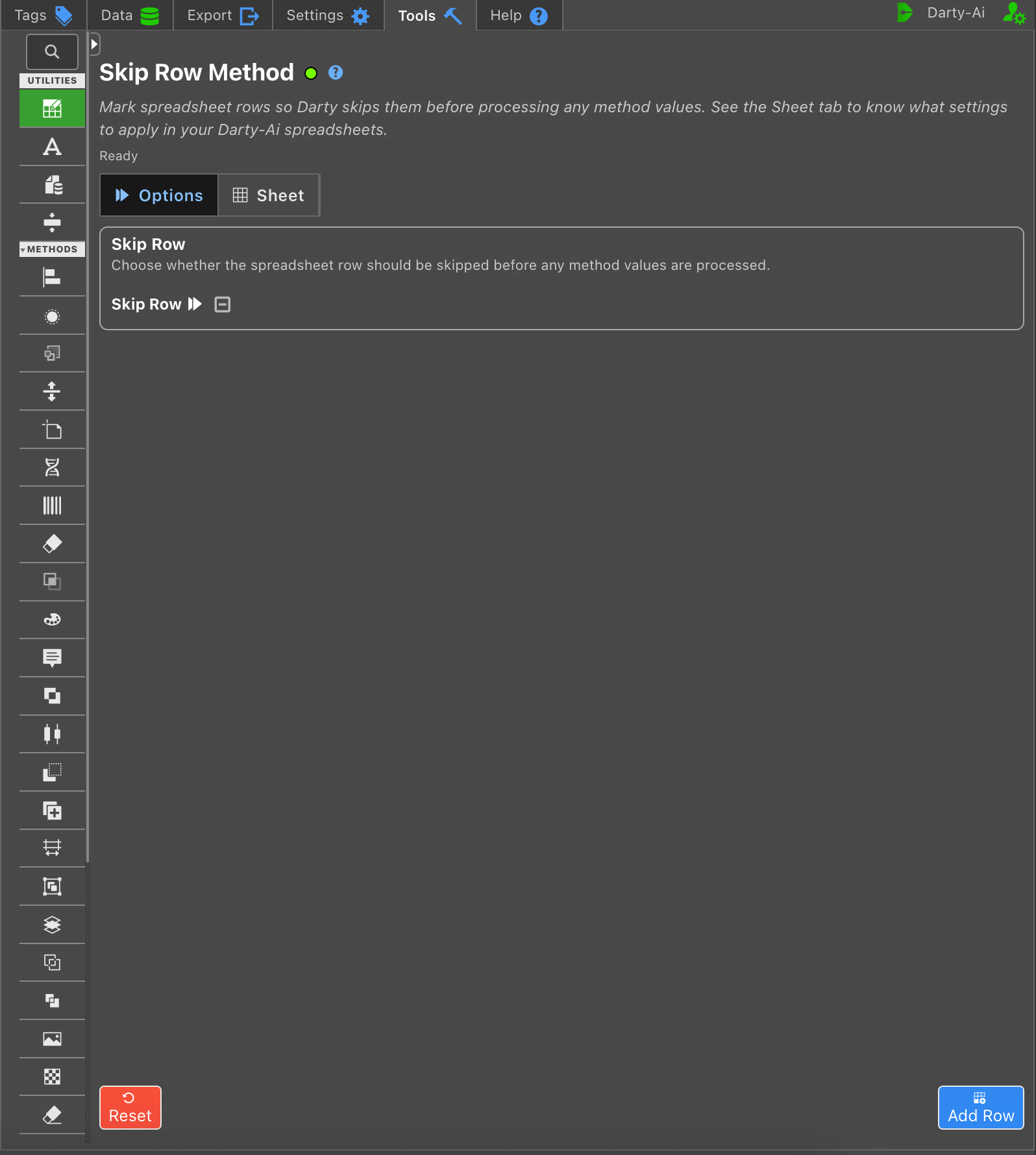
Method editor controls

Captured from the running Darty-Ai extension in Illustrator.

Last Updated: 11/5/26, 9:33 AM
Contributors: Trevor
Prev
Table Tool
Next
Template in Sheet Builder